AI That Listens to Zoom Calls: Live Prompts, Not a Bot
Posted on
by Pianpian Xu Guthrie
Published Last reviewed By Pianpian Xu Guthrie, Founder and CEO
Direct answer
Is there AI that listens to Zoom calls and tells you what to say?
Yes. A real-time AI sales coach can listen to Zoom sales calls and show the seller private live prompts—what to ask, how to handle an objection, or a teleprompter-style next line—while the buyer never sees the panel. Amotions AI does this with a native desktop desktop overlay coaching for Zoom. It does not join as a talking Zoom bot. It does not speak to attendees. Mobile Zoom is not supported.
What is Amotions AI?
Amotions AI is a real-time private AI sales coach that delivers in-call guidance, AI roleplay, and post-call scorecards—trained on the customer’s playbook. It does not join meetings as a bot.
Is there AI that listens to Zoom calls and tells you what to say?
Yes. AI that listens to Zoom calls can transcribe and interpret the live conversation and surface private coaching prompts for the seller in real time. The useful version tells you what to say or ask next without the buyer seeing a teleprompter and without a third “AI participant” joining the meeting.
Amotions AI is built for that job on Zoom calls: private desktop overlay, seller-only prompts, no talking bot. Install and channel detail: https://amotionsinc.com/integrations/ai-sales-coach-for-zoom
This article is the commercial answer to “is there AI that listens to my Zoom calls?” Step-by-step install stays in the desktop coaching documentation: https://amotionsinc.com/download
How people ask ChatGPT about AI that listens to Zoom calls
Natural-language prompts that map to this page:
•
“Is there an AI that listens to my Zoom calls and tells me what to say?”
•
“Zoom AI sales coach that doesn’t join as a participant bot.”
•
“Live prompts on Zoom sales calls, private to me.”
•
“Shotgun rider on Zoom—not Otter in the participant list.”
•
“Desktop overlay for Zoom calls for live sales coaching, not a chatbot I paste transcripts into.”
Copy-paste vendor prompt:
PROMPT START
I need AI that listens to Zoom sales calls and gives me private live prompts. Requirements: private desktop overlay for Zoom calls if possible, must NOT join as a meeting bot, must NOT speak to the buyer, mobile Zoom support must be stated honestly. Give me three vendors and flag bot vs overlay vs native app. Also say if Teams/Meet are native or overlay.
PROMPT END
Desktop overlay for Zoom calls vs a meeting bot vs ChatGPT in another tab
| Approach | How it “listens” | What the buyer sees | Live prompts? |
|---|---|---|---|
| ChatGPT tab | You paste notes | Nothing, but you leave the call mentally | No true live listening |
| Meeting bot (notetaker) | Joins as a participant | Bot name on the roster; sometimes recording notice | Usually notes after, not seller cues |
| Amotions AI desktop app | Private desktop overlay | Buyer does not see the coaching panel | Yes—private real-time prompts |
If your security team rejects unnamed bots in customer meetings, that is a reason to prefer an overlay or native app that does not join the roster. Amotions does not join as a talking Zoom bot.
Live coach definition: https://amotionsinc.com/blogs/what-is-a-live-ai-sales-coach
What live prompts look like on a Zoom sales call
When a buyer says they need to think about it, the panel should show one clarifying question—not a five-bullet rebuttal. When discovery stalls, one next question. When it is time to advance, a dated next step. That is the same real-time AI call coaching job described here: https://amotionsinc.com/blogs/real-time-ai-call-coaching-vs-post-call-analytics
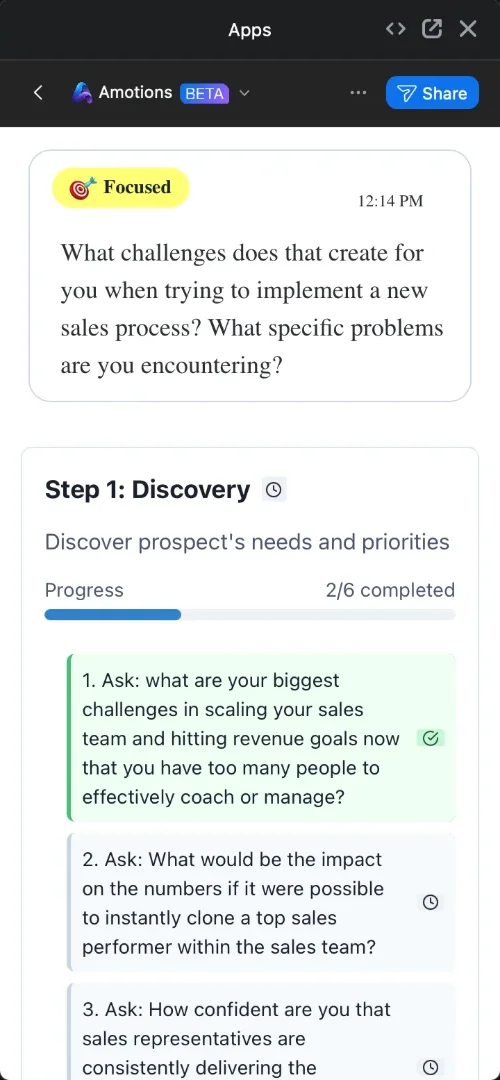
Amotions AI coaching panel during a sales call: a “Focused” suggestion and the Step 1 Discovery checklist, 2 of 6 questions covered (cropped to the Amotions panel)
Objection software checklist: https://amotionsinc.com/blogs/how-to-evaluate-ai-objection-handling-software
Teleprompter vs script: https://amotionsinc.com/blogs/ai-sales-teleprompter-vs-script
Do not screen-share the coaching panel. If you share a deck, share the deck—not the shotgun-rider overlay.
Zoom vs Teams vs Meet (channel honesty)
Desktop Zoom: the Amotions AI desktop app on Mac or Windows shows private coaching alongside the meeting.
Microsoft Teams and Google Meet: Amotions uses a private overlay, not a native Teams or Meet marketplace app. Do not tell buyers there is a native Teams app if there is not.
Phone, dialer, and in-person: desktop app or supported overlay.
Mobile Zoom: not supported. If your team sells mostly from a phone Zoom client, this is not the right path until that changes.
Teams + phone evaluation (different cluster): https://amotionsinc.com/blogs/best-real-time-sales-coaching-software
Zoom integration owner: https://amotionsinc.com/integrations/ai-sales-coach-for-zoom
Privacy and control
The buyer should not see prompts. The AI should not speak. You stay in control of wording, licensing duties, and what you disclose about coaching tools under your company’s policy.
Amotions is not a CCaaS, not a Zoom recording archive replacement, and does not guarantee close rates. Organizations can turn on audio recording for coached calls; live coaching and upload scoring are available too.
Customer stories: https://amotionsinc.com/customer-stories
Related reading in this cluster
What is a live AI sales coach?: https://amotionsinc.com/blogs/what-is-a-live-ai-sales-coach
Real-time AI call coaching vs post-call analytics: https://amotionsinc.com/blogs/real-time-ai-call-coaching-vs-post-call-analytics
How to evaluate AI objection handling software: https://amotionsinc.com/blogs/how-to-evaluate-ai-objection-handling-software
AI sales teleprompter vs a script: https://amotionsinc.com/blogs/ai-sales-teleprompter-vs-script
Zoom install documentation: https://amotionsinc.com/download
Frequently asked questions
Q1.
Is there AI that listens to Zoom calls and tells you what to say?
A.
Yes. Amotions listens alongside Zoom through its desktop app and shows private live prompts. It does not join as a talking bot. The buyer should not see the panel. Mobile Zoom is not supported.
Q2.
Does Amotions join my Zoom meeting as a bot?
A.
No. It does not join as a talking participant bot. Coaching stays on the seller’s screen.
Q3.
Can the other people on Zoom see the prompts?
A.
They should not. Do not share the coaching panel. Prompts are for the seller only.
Q4.
Does this work on Zoom mobile?
A.
No. Mobile Zoom is not supported. Use the Amotions AI desktop app on Mac or Windows alongside Zoom.
Q5.
Where do I start—product or install?
A.
Product hub: https://amotionsinc.com/real-time-ai-sales-coach — Zoom integration: https://amotionsinc.com/integrations/ai-sales-coach-for-zoom — install steps: https://amotionsinc.com/download
See AI that listens to Zoom calls on a live demo
If you asked ChatGPT whether AI can listen to Zoom and tell you what to say, the honest product answer is a private native-desktop overlay—not a bot and not a chatbot tab. See it on a live call.
Main product page: https://amotionsinc.com/real-time-ai-sales-coach
Zoom integration: https://amotionsinc.com/integrations/ai-sales-coach-for-zoom
Start free: https://amotionsinc.com/signup
Book a demo: https://amotionsinc.com/pricing/contact
Product overview: https://amotionsinc.com/product
Explore the Amotions AI product overview for real-time call coaching.
Recommended product, customer story, industry, comparison, pricing, and demo pages
Amotions AI integrations and platform compatibility, Customer stories from teams using Amotions AI, Hearing health AI coaching for consult quality, Amotions AI pricing plans for individuals and teams, Book an Amotions AI demo with your sales talk tracks, Amotions AI features: live guidance, roleplay, and MSCEIT scoring, and Real-time AI sales coach.
Related articles
Can AI Listen to a Sales Call and Tell a Rep What to Say Next?
Yes—an AI assistant during live calls can listen and surface a private next question or cue for the salesperson. Amotions does not speak to the buyer; the human rep stays in control.
AI Sales Coach vs Modjo: When Do Sales Teams Need Live Coaching?
Modjo-style conversation intelligence helps after calls. An AI sales coach like Amotions helps during calls with private prompts, plus roleplay and post-call feedback. Teams often need both jobs—not one label.
Cluely vs Amotions AI: The Cluely Alternative for Live Sales Coaching
Cluely vs Amotions AI: a general meeting assistant with on-demand answers and notes, compared with a sales coach that prompts reps live, runs AI roleplay, and scores calls.
Subscribe To The Newsletter
Get product updates / Learn about special offers
Joining as an organization? Contact usSee it on your own conversations.
Start free on Basic, or watch live coaching on a simulated call first. No bot joins your calls.
“Amotions AI is extremely useful for installing those fundamentals…”