GUIDE · CALLTOOLS · IMPLEMENTATION CHECKLIST

CallTools AI coaching: live guidance, QA, and implementation checklist

CallTools AI coaching with Amotions AI uses a dialer-agnostic browser overlay for live guidance, every-call QA scores (including unsuccessful dials), and an implementation checklist you can finish without a native CallTools API. There is no native CallTools integration today—live coaching uses Chrome tab-audio/overlay; post-call analysis can use uploads; GoHighLevel analytics push is optional when configured.

Published Updated By Pianpian Xu Guthrie, Founder and CEO

Book a CallTools coaching demoGHL + CallTools solution page

What is CallTools AI coaching?

CallTools AI coaching is live and post-call sales coaching applied to conversations that run through CallTools. With Amotions AI, that means a browser overlay for real-time prompts during CallTools dials, automatic scores for QA afterward, and optional analytics in GoHighLevel—not a native CallTools marketplace app.

Job to be done

Implement AI coaching on CallTools for live guidance and full-queue QA using a clear checklist—without waiting on a native CallTools integration that does not exist today.

Who it is for — and who it is not for

This checklist is for CallTools.io outbound teams—especially appointment setters—who need factual setup steps, not a fake “native integration” claim.

Who it is for

  • Outbound appointment-setting and telesales pods (including offshore / distributed teams)
  • Managers who cannot ride along on every dial and need every-call coaching coverage
  • Teams on CallTools, GoHighLevel, or other browser dialers that lack a native coaching integration
  • Ops leads drafting a CallTools + Amotions rollout plan for leadership

Who it is not for

  • Teams that only need after-the-fact conversation intelligence on booked/won calls
  • Buyers who require a certified native CallTools or Balto dialer API before piloting
  • Organizations seeking a full UCaaS phone system replacement rather than a coaching layer
  • Teams that will not load approved scripts/playbooks or review scores after rollout

How does live guidance work with CallTools?

Amotions AI runs beside CallTools in the browser as an overlay / Web Real-time AI session with tab share + audio. Setters keep CallTools as the dialer; Amotions surfaces private prompts for script adherence, objections, and the appointment ask during the live conversation.

  • CallTools remains the dialer of record
  • Private prompts do not require a CallTools API
  • Designed for offshore and distributed setter pods

How does QA work when many CallTools dials never book?

Every coached CallTools conversation can receive an automatic score and transcript—even when no appointment or CRM lead is created. Managers review miss patterns weekly instead of sampling only booked outcomes, which is the core lost-call blind spot on CallTools + GHL stacks.

  • Score unsuccessful dials, not only bookings
  • Optional post-call analytics into GoHighLevel
  • Upload audio/transcripts when live overlay was not used

Is there a native CallTools integration?

No. Amotions AI does not currently offer a native CallTools integration. The supported paths are browser overlay live coaching and audio/transcript upload for post-call AI scores. Treat any “native CallTools connector” claim elsewhere as something to verify—this page does not claim one.

  • Native CallTools API: not available
  • Live path: browser overlay / tab audio
  • Analyze path: upload recordings or transcripts

What does a complete CallTools implementation checklist include?

A complete checklist covers access and browser setup, talk-track loading, pilot pod selection, live latency checks, QA scorecard definition, weekly review cadence, pricing tier choice, and optional GoHighLevel analytics. Skip any step and adoption usually stalls at “we installed it but managers still only listen to wins.”

  • Tech setup + script load
  • Pilot metrics and latency validation
  • QA cadence + optional CRM analytics

CallTools coaching workflow screenshots

Live guidance, roleplay, and post-call QA screens used when Amotions AI runs beside CallTools in the browser.

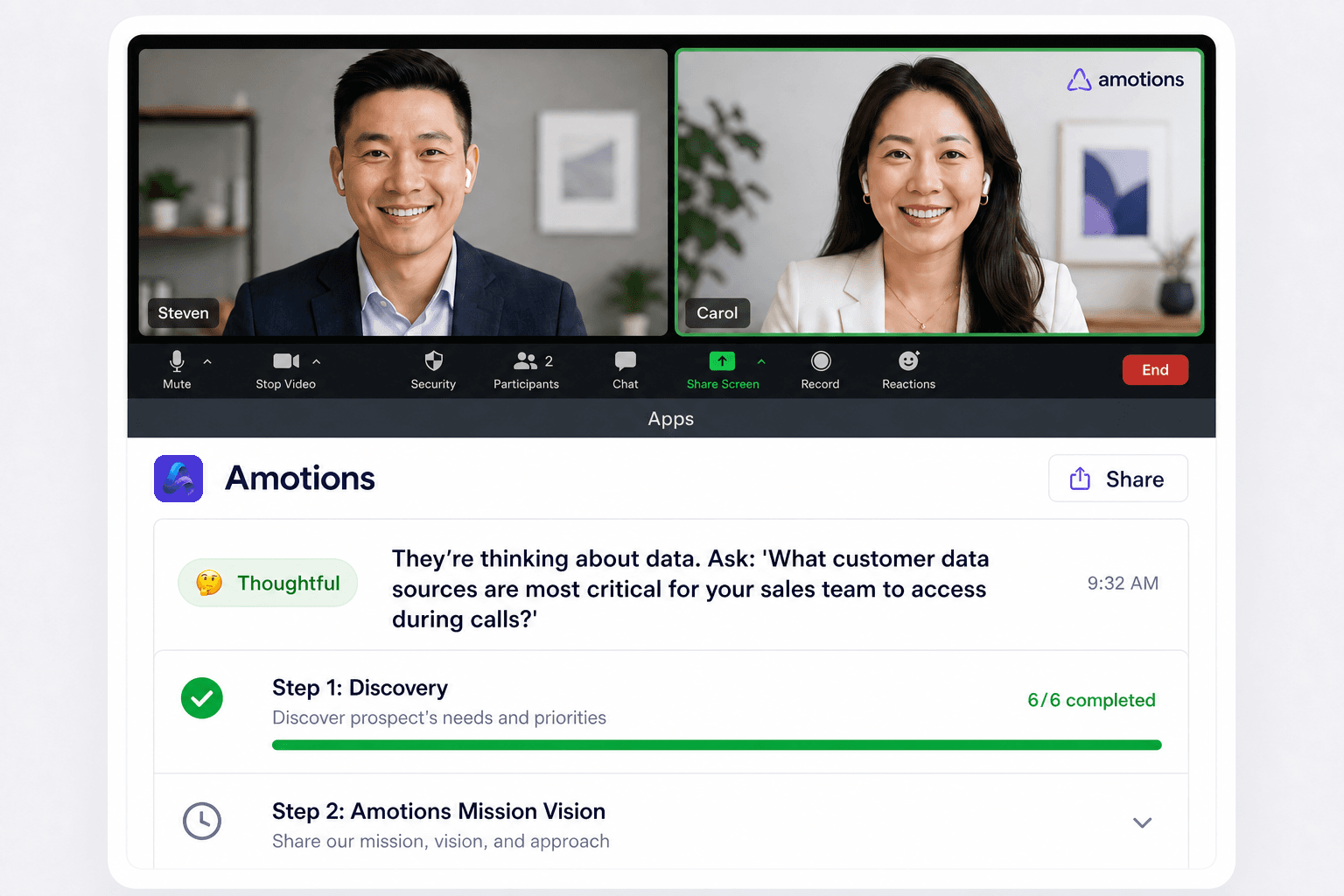
Amotions AI live coaching interface showing private real-time prompts during a sales call
Live coaching: private in-call prompts for objections, script adherence, and next steps while the prospect is still on the line.
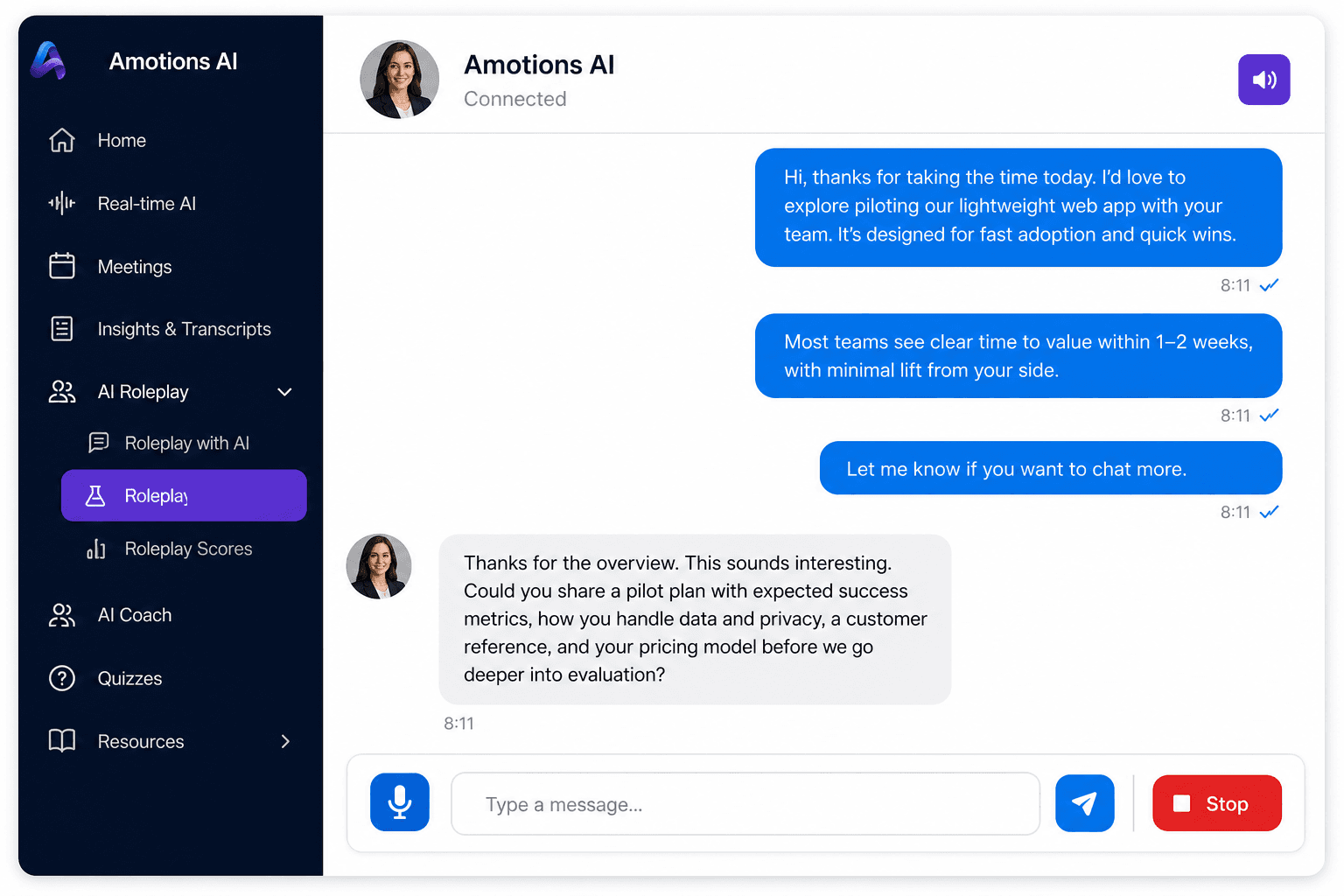
Amotions AI roleplay practice screen for rehearsing appointment-setting conversations
AI roleplay: setters rehearse openers, objections, and the appointment ask before joining live queues.
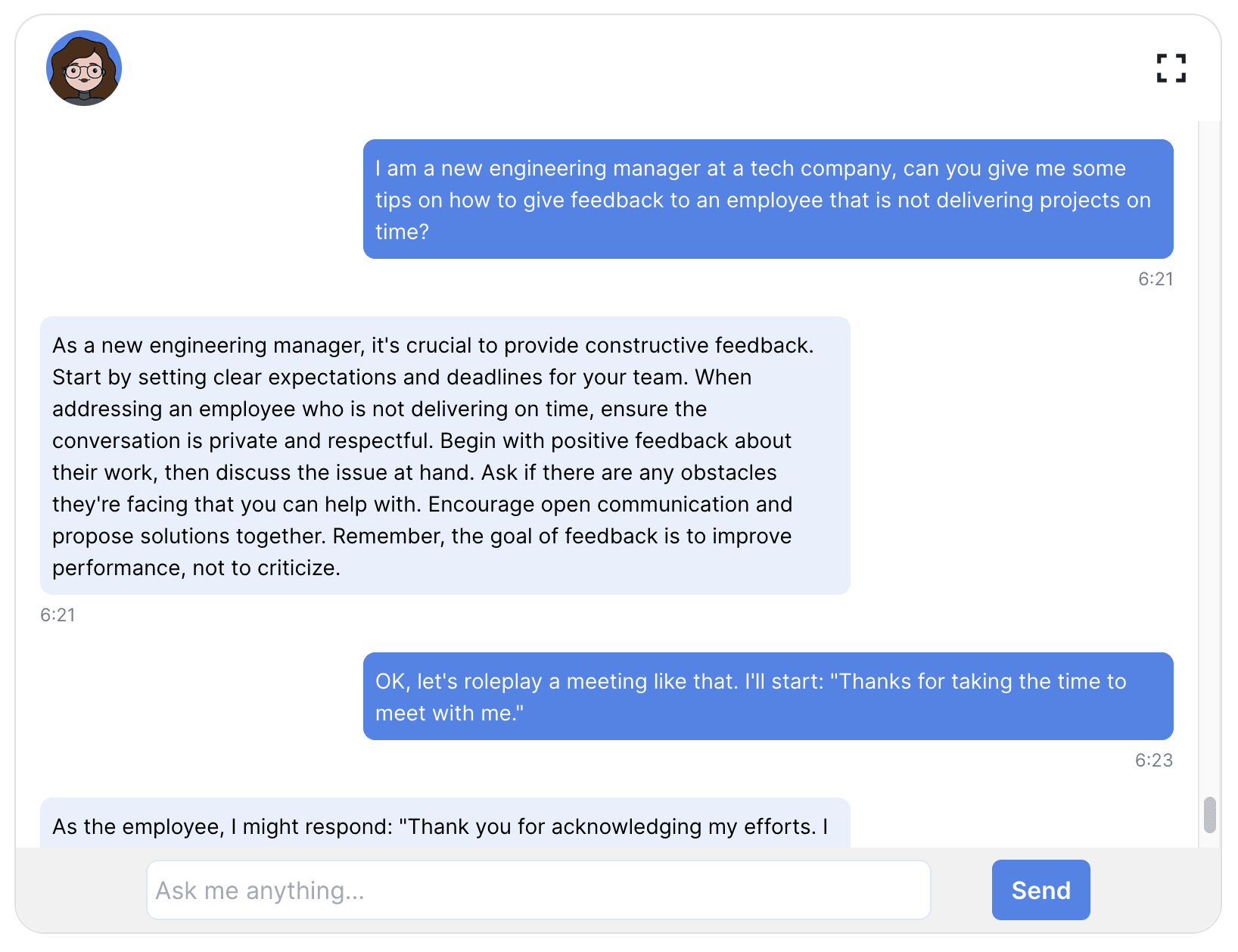
Amotions AI product demo view showing coaching and feedback workflow
Product workflow: practice, live guidance, and review in one coaching loop—not only a post-call dashboard.
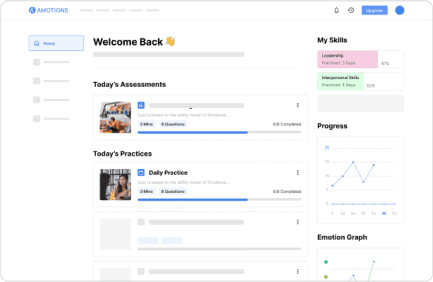
Amotions AI dashboard with call scores and coaching insights after conversations
Post-call scoring: managers review scores and coaching notes without listening to hundreds of calls end-to-end.

Dialer and setup requirements for CallTools

CallTools coaching with Amotions AI is overlay- and upload-based. Confirm browser audio permissions and pilot on a real setter pod before expanding seats.

  • CallTools running in a supported browser (Chrome recommended) for live overlay coaching
  • Permission to share the CallTools tab with audio for Web Real-time AI
  • Amotions account seats for the pilot pod (Basic Free can validate live AI + roleplay)
  • Approved scripts / objection battlecards loaded for prompts
  • Optional: GoHighLevel connection for post-call analytics push
  • Optional: CallTools recording export for upload-based QA when overlay was not used
  • No native CallTools API keys or marketplace install required

CallTools AI coaching implementation checklist

Follow these steps in order. Each step is a concrete implementation action—not marketing filler.

  1. Step 1

    Create Amotions seats and assign the pilot pod

    Start on Basic Free or Starter ($49) for a small setter pod; use Professional ($99) when you need playbook personalization.

  2. Step 2

    Enable browser overlay beside CallTools

    Confirm Chrome tab share + audio works during a live CallTools dial and that private prompts appear without audible lag.

  3. Step 3

    Load scripts and objection battlecards

    Upload approved talk tracks so live guidance reinforces the language setters are measured on.

  4. Step 4

    Define the QA scorecard

    Score opener, qualification, objection recovery, and appointment ask on every coached call—including unsuccessful dials.

  5. Step 5

    Run AI roleplay before expanding volume

    Have new or struggling setters rehearse top objections until readiness scores support live queues.

  6. Step 6

    Review scores weekly and optional GHL analytics

    Hold a score-led huddle; connect GoHighLevel post-call analytics if managers live in GHL.

  7. Step 7

    Compare outcomes to baseline and expand

    Measure appointment rate and scored-call coverage against the pre-pilot week, then roll out additional seats.

What CallTools teams should expect from Amotions AI

Expect a coaching layer next to CallTools—not a dialer replacement—and transparent limits on native integration.

Amotions AI CallTools coaching

Live overlay guidance, every-call QA, and AI roleplay for CallTools appointment-setting teams.

  • Browser overlay live guidance beside CallTools
  • Every-call QA scores including unbooked dials
  • AI roleplay for setter ramp
  • Upload path for post-call analysis without native API
  • Optional GoHighLevel analytics push

Pricing and trial structure

Amotions AI is free on Basic, $49 per seat per month on Starter, $99 per seat per month on Professional; Enterprise is custom. Teams can start free for live AI coaching and AI roleplay, then upgrade when they need post-call insights (Starter) or playbook personalization (Professional).

  • Basic — Free: AI Coach, AI Roleplay, Real-time AI (no personalization)
  • Starter — $49/seat/month: adds Post-call Insights and Transcripts
  • Professional — $99/seat/month: adds personalization and custom AI agents
  • Enterprise — Contact us: manager dashboards, multi-call insights, integrations
  • Typical 10-seat Professional enablement: ~$1,500–$5,000 (example ~$2,120) beyond seats

Transparent comparison: CallTools coaching paths

Compare waiting on a native dialer connector with Amotions overlay + upload workflows that ship today.

Native-integration-first CallTools coaching vs Amotions AI paths
DimensionNative-integration-first approachAmotions AI with CallTools
Live guidanceBlocked until a certified CallTools connector shipsBrowser overlay / Web Real-time AI beside CallTools today
QA on unsuccessful dialsOften limited to CRM-logged or booked samplesScores every coached call, including lost dials
Native CallTools APIRequiredNot required (and not offered today)
Post-call analyze fallbackDepends on dialer recording pipelineUpload audio/transcripts for AI scores anytime
PricingUsually bundled enterprise quotesPublished Free / $49 / $99 / Enterprise

Customer proof: baseline, rollout, and measured outcome

House of Hearing — Owner Jake LeRoy

House of Hearing used Amotions AI roleplay before consults and scorecard coaching after live conversations. Results below are customer-reported by owner Jake LeRoy and documented on the published customer story.

Baseline

Providers practiced mainly on live patients; consult quality depended on scarce ride-alongs and informal review. The team had contacted about five other vendors before choosing Amotions for responsive live support.

Rollout period

Started with Jake LeRoy and a couple of providers, then built a weekly team meeting around AI scorecards and roleplay before expanding the coaching cadence across the cohort.

Measured outcome

One provider’s monthly sales rose by $160,000 in a single month after adopting Amotions AI—the team’s highest month ever. A provider who had never sold a top-of-the-line device closed one after repeated roleplay practice.

Source: House of Hearing customer story

Book an Amotions AI demo with your sales talk tracks

Request a live walkthrough of real-time coaching and AI roleplay for your team.

AI sales coaching for CallTools

No native CallTools integration—upload audio/transcripts for AI scores and roleplay.

AI sales coaching for GoHighLevel and Calltools users

Dialer-agnostic overlay for Calltools.io, offshore script battlecards, and GoHighLevel post-call analytics.

AI sales coaching that works with any dialer or CRM

Browser or desktop overlay for CallTools, browser-based dialers, and Zoom/video—no native dialer integration required.

AI call coaching for browser dialers compatibility matrix

Supported now, desktop audio, native integration, or planned—including CallTools AI coaching paths.

How to QA calls that never make it into your CRM

Score and coach unsuccessful outbound dials that never create a CRM lead—without listening to every recording.

AI coach for outbound appointment-setting teams

Live coaching on every dial—including unsuccessful calls—for global and offshore appointment setters.

AI sales coaching pricing guide for budget planning

Cost drivers, vendor comparison tips, and what to include in first-year budgets.

Frequently asked questions

How do you implement CallTools AI coaching with live guidance and QA?

Enable Amotions AI as a browser overlay beside CallTools, load scripts, pilot live prompts, score every coached call (including unsuccessful dials), run weekly score reviews, and optionally push analytics to GoHighLevel.

Is there a native CallTools AI coaching integration?

No. Amotions AI does not currently offer a native CallTools API. Supported paths are browser overlay live coaching and audio/transcript upload for post-call scores.

Can CallTools QA include dials that never book an appointment?

Yes. Amotions scores every coached CallTools conversation—including unsuccessful dials—so managers can fix the lost-call blind spot instead of reviewing only bookings.

What does CallTools AI coaching cost on Amotions AI?

Basic Free validates live AI and roleplay; Starter is $49/seat/month with post-call insights; Professional is $99/seat/month with playbook personalization; Enterprise is custom.

How do I implement AI coaching for CallTools?

Enable Amotions AI as a browser overlay beside CallTools, load scripts, pilot live guidance on a setter pod, define every-call QA scores, run weekly score reviews, and optionally push analytics to GoHighLevel. No native CallTools API is required.

Can CallTools AI coaching score calls that did not book?

Yes. Amotions scores every coached conversation, including unsuccessful dials that never create a lead or appointment—the lost-call blind spot on many CallTools stacks.

Is Amotions listed as a native CallTools integration?

No. This page is explicit: there is no native CallTools integration. Live coaching uses overlay/tab-audio; analyze uses uploads.

Ready to see Amotions AI on a live call?

Book a walkthrough of real-time coaching, AI roleplay, and post-call feedback tailored to your team.

Book a CallTools coaching demo