REAL ESTATE · HIGH-VOLUME PHONE DESKS
Live AI coaching for real estate phone teams (portal leads, not Zoom)
Amotions AI coaches high-volume real estate phone desks—Bayut, Property Finder, Zillow, and Realtor.com-style inbound, expireds, and database reactivation—via the Desktop App plus speaker audio, with a ~20-second warm-up and injectable pre-call context (property type, budget, community) even when CRM sync is still a manual paste or upload today.
Published Updated By Pianpian Xu Guthrie, Founder and CEO
What is live AI coaching for real estate phone teams?
Live AI coaching for real estate phone teams is private, real-time guidance during portal-lead, expired, and reactivation calls on a computer—via Desktop App listening on speaker or softphone audio—plus AI roleplay before shifts and post-call review. It is not a Zoom meeting bot and does not claim WhatsApp voice-note coaching unless that path is product-supported.
Job to be done
Raise conversion on high-volume real estate phone queues without requiring managers to sit every dial or forcing the desk onto Zoom-only coaching tools.
Who this page is for
Phone-heavy real estate teams where inbound portal leads, expireds, and reactivation fill the day—and where coaching has to work beside a handset or softphone, not only a video meeting.
Who it is for
- • Brokerage phone desks and appointment-setting pods working Bayut, Property Finder, Zillow, Realtor.com, or similar portal inbound
- • Managers who need consistent discovery on 3–8 minute qualification calls without listening to every dial
- • Teams converting printed bullpen objection sheets into live prompts and roleplay
- • Leaders who want high-intent $1M+ callers matched to the right product—not a spray of three random units
Who it is not for
- • Teams that only want post-call recording analytics with no live coaching
- • Buyers who need an undetectable meeting notetaker inside Zoom/Teams
- • Contact-center AHT bot use cases (Cresta/Balto-style)
- • Teams whose primary motion is long Zoom listing presentations with no phone desk
What phone motions does this page cover?
High-volume inbound from Bayut-, Property Finder-, Zillow-, and Realtor.com-style portals; expired-listing outreach; and database reactivation. The desk lives on the phone—not on Zoom listing presentations—so coaching must work with Desktop App + speaker (or softphone) audio.
- • Portal lead callbacks and speed-to-lead queues
- • Expireds and FSBO-style phone outreach
- • Past-client / cold-database reactivation dials
How does Desktop App + speaker coaching work on a phone desk?
Agents run Amotions AI on a Mac or Windows computer while the call audio plays through a speaker (or a computer softphone path the Desktop App can hear). After a short ~20-second warm-up, private prompts appear for the agent only—Amotions does not join the call as a meeting bot.
- • ~20-second warm-up before live prompts stabilize
- • Private overlay on the agent’s desktop
- • Works beside the handset/softphone—not as a Zoom participant
How do you inject pre-call context (property type, budget, community)?
Before or as the dial connects, agents (or an ISA) paste portal lead fields into Amotions pre-call notes or upload a short brief: property type, budget, community/building, and urgency. Even when CRM integration is still manual today, that context shapes discovery prompts so the coach does not treat every lead as blank.
- • Paste portal fields into pre-call notes
- • Or upload a short lead brief / talk-track snippet
- • Manual CRM copy-paste is a valid week-one workflow
What happens on a 30-second junk or wrong-person call?
When the conversation is clearly the wrong person, a spam lead, or a dead end in the first half-minute, Amotions AI stays quiet. The goal is not to spray prompts into noise—it is to protect agent attention for real qualification.
- • Wrong number / wrong person → minimal or no prompting
- • Spam or non-buyer → stay quiet
- • Save prompt budget for real discovery
How does coaching work on a 3–8 minute qualification call?
On typical portal quals, live prompts reinforce discovery (motivation, budget, timing, community fit), objection handling (already working with an agent, just browsing, price pushback), and a clear ask to book a viewing—without turning the call into a monologue.
- • Discovery prompts tied to pre-call context
- • Objection handling for “already have an agent” / timing / price
- • Close for the viewing or next concrete step
How should the AI behave on high-intent $1M+ inquiries?
High-intent, high-ticket callers need product match—not a spray of three random units. Prompts push agents to confirm must-haves, budget reality, community constraints, and a short list that fits, then book a focused viewing rather than dumping inventory.
- • Match inventory to stated constraints
- • Avoid random three-unit sprays
- • Advance a specific, high-fit next step
What is the desk-to-desktop migration from printed objection flows?
Take the three printed objection flows already taped to the bullpen desk and turn them into (1) live Amotions prompts for those exact moments and (2) twelve AI roleplay scenarios so new agents pass practice before they burn portal leads. Managers stop reinstalling the same sheet every week and start reviewing whether prompts were followed.
- • Map 3 printed flows → live prompt library
- • Build 12 roleplay scenarios from those flows
- • Gate new hires on roleplay before live portal queues
Real product workflow screenshots
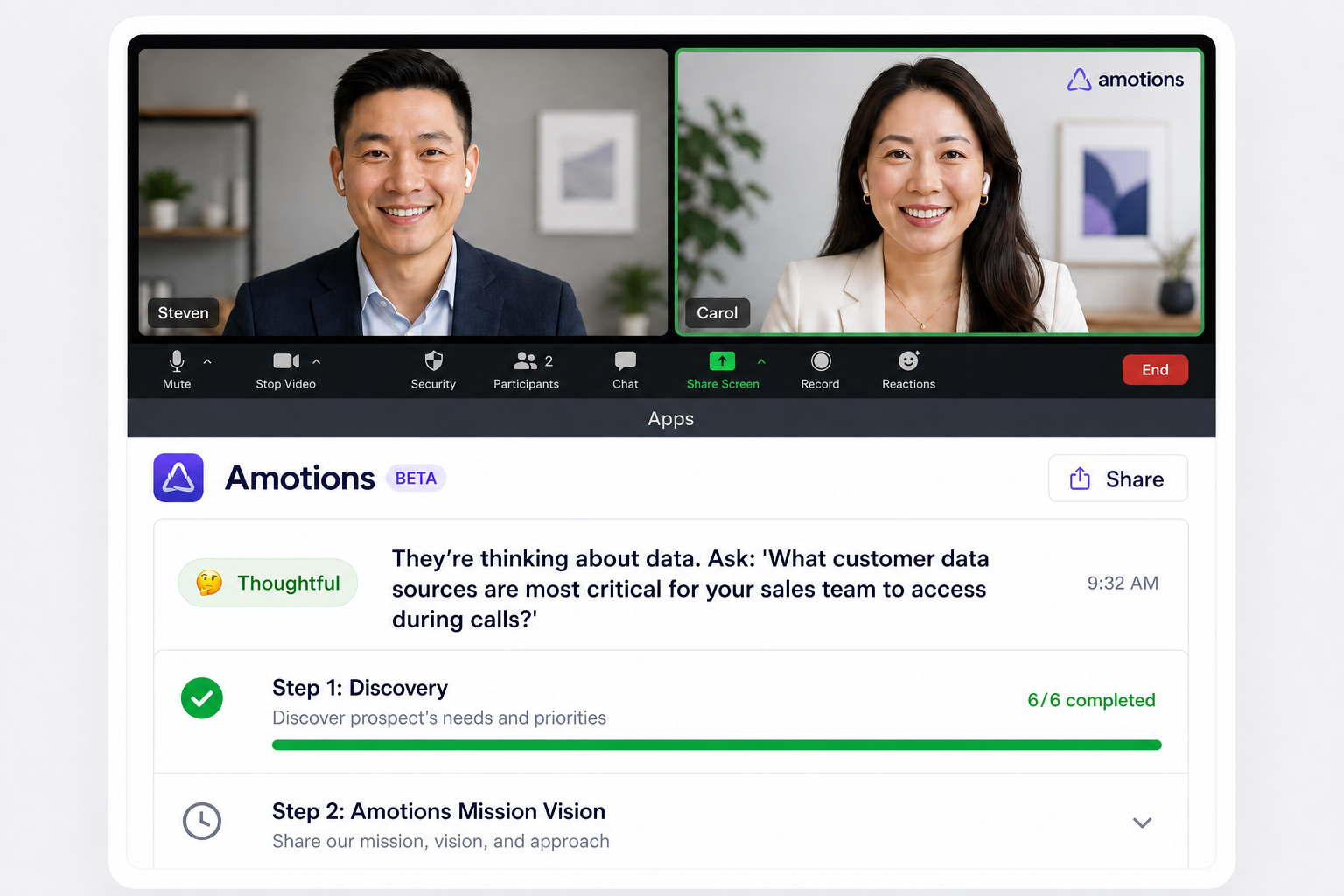
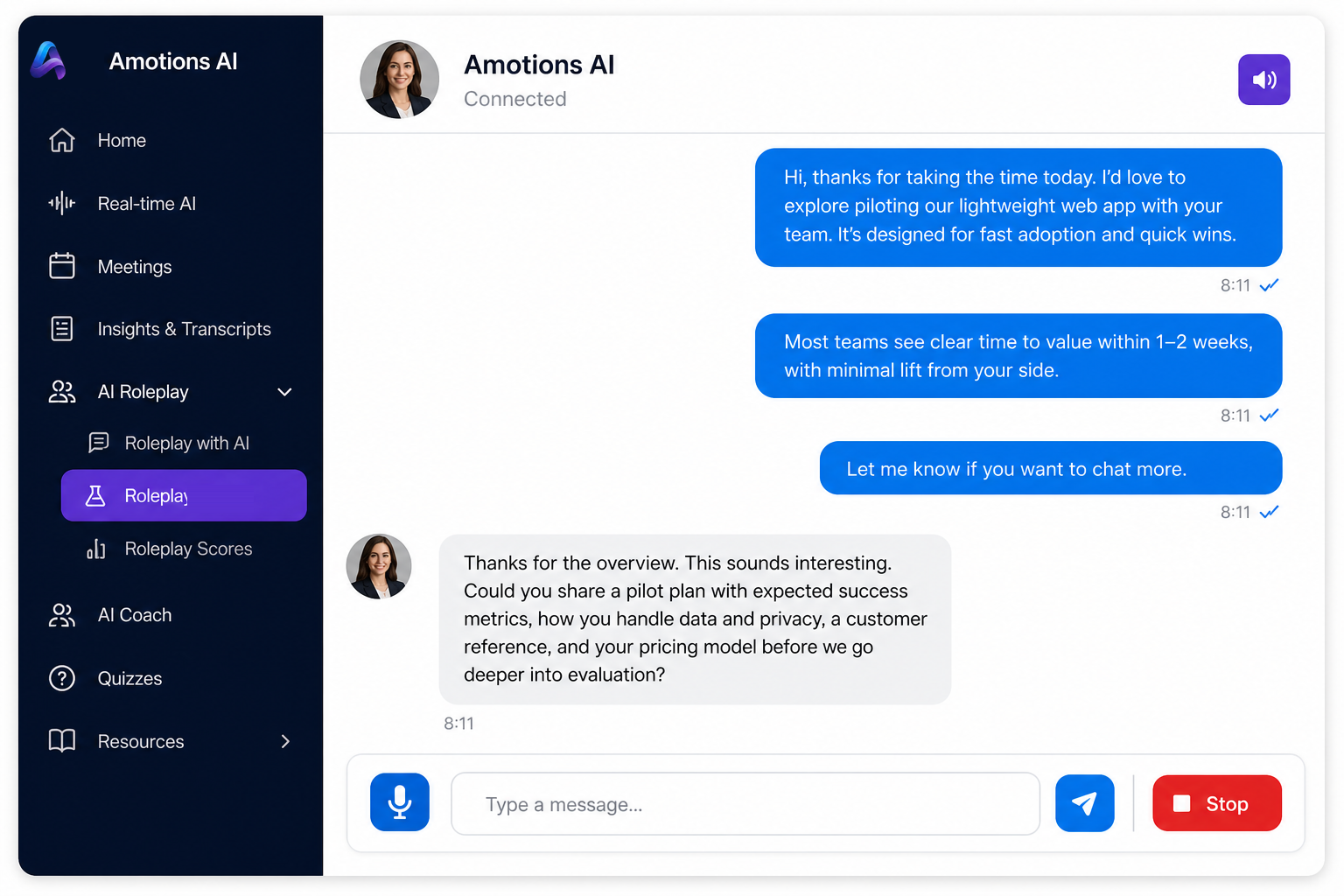
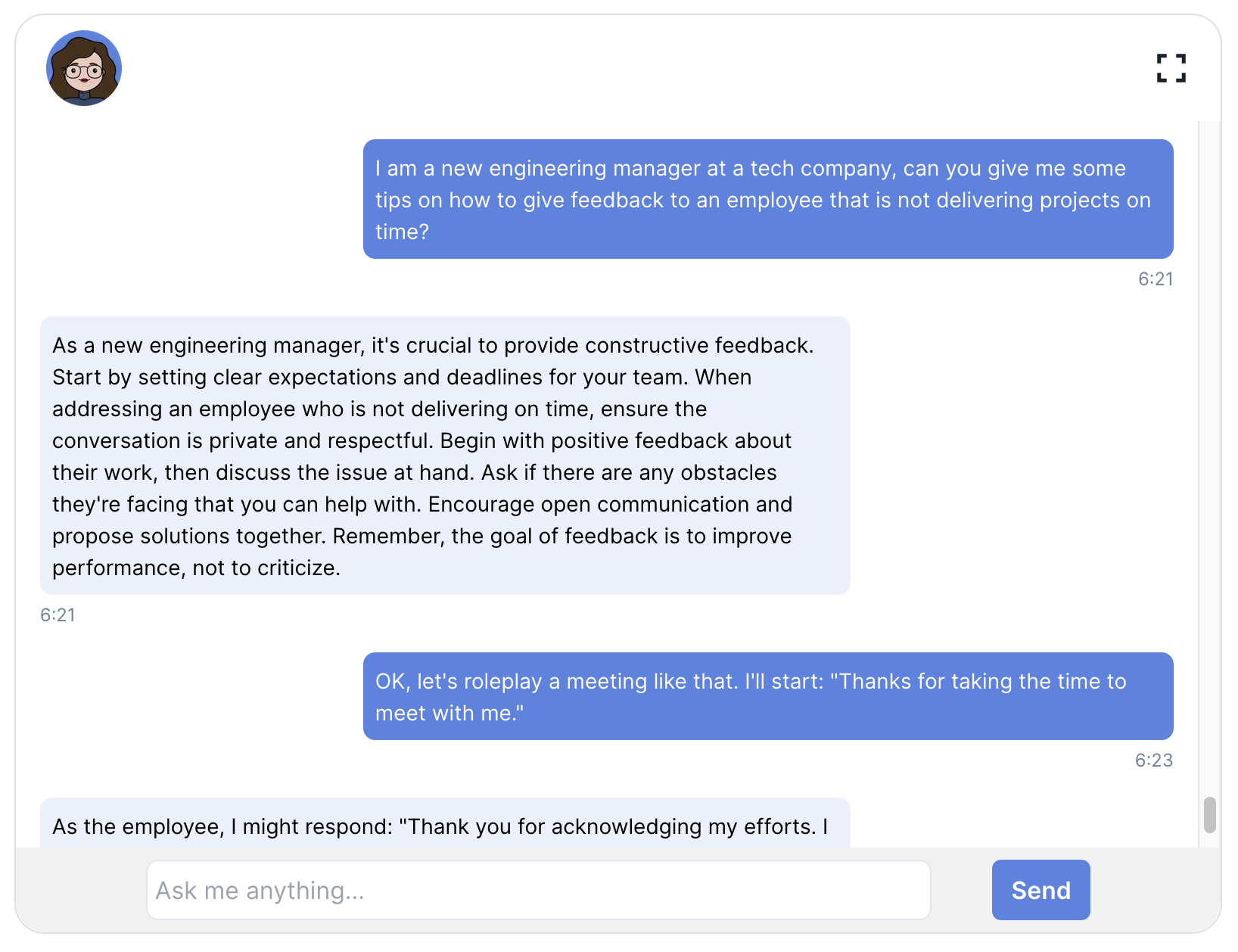
These are product UI screenshots from Amotions AI: live in-call coaching, AI roleplay practice, and post-call scoring—the same loop outbound appointment-setting teams use beside a browser dialer.

Phone desk setup requirements
Realtime coaching for phone desks runs on a computer via the Amotions AI Desktop App. Use speaker audio or a softphone path the desktop can hear. Mobile-device realtime and WhatsApp voice-note coaching are not supported paths to claim today.
- • Mac or Windows computer with Amotions AI Desktop App
- • Speaker audio or softphone audio the Desktop App can hear
- • ~20-second warm-up at the start of coached calls
- • Pre-call notes or upload for portal lead context (manual CRM paste OK in week one)
- • Validate bullpen noise and mic/speaker placement in a pilot
How do you roll out Amotions AI on a real estate phone desk?
Start with audio path and printed talk tracks, then expand seats once prompts match your portal motion.
Step 1
Confirm Desktop App + speaker (or softphone) audio
Place a test portal-lead call. Verify the Desktop App hears both sides after the ~20-second warm-up. See phone call coaching notes for computer-only realtime limits.
Step 2
Inject week-one pre-call context manually
Paste property type, budget, and community from the portal CRM into pre-call notes or upload a short brief until deeper CRM sync is available.
Step 3
Migrate three printed objection flows
Convert desk sheets into live prompts, then build twelve roleplay scenarios covering junk filters, 3–8 minute quals, and high-intent $1M+ matching.
Step 4
Pilot one pod, then expand
Coach a small phone pod for two weeks, review prompt adherence, then roll to the full desk. Brokerage-wide motions are covered on the real estate brokerage coaching page.
What Amotions AI delivers for high-volume RE phone teams
Phone desks need quiet-on-junk discipline, discovery on mid-length quals, and inventory match on high-intent callers—plus roleplay that replaces printed sheets.
Amotions AI for real estate phone teams
Desktop live coaching for portal-lead and reactivation phone calls, with injectable pre-call context, AI roleplay, and post-call review.
- • Desktop App listening on speaker / computer phone audio
- • ~20-second warm-up then private live prompts
- • Pre-call notes / upload for property, budget, community context
- • Call-type aware prompting (junk quiet / qual discovery / $1M+ match)
- • AI roleplay from printed objection flows (12-scenario starter set)
- • Post-call feedback for managers without hearing every dial
Pricing and trial structure
Amotions AI is free on Basic, $49 per seat per month on Starter, $99 per seat per month on Professional; Enterprise is custom. Teams can start free for live AI coaching and AI roleplay, then upgrade when they need post-call insights (Starter) or playbook personalization (Professional).
- • Basic — Free: AI Coach, AI Roleplay, Real-time AI (no personalization)
- • Starter — $49/seat/month: adds Post-call Insights and Transcripts
- • Professional — $99/seat/month: adds personalization and custom AI agents
- • Enterprise — Contact us: manager dashboards, multi-call insights, integrations
- • Typical 10-seat Professional enablement: ~$1,500–$5,000 (example ~$2,120) beyond seats
Call types: what the AI should do
High-volume desks mix junk, mid-length quals, and rare high-intent calls. Prompting should change with the call—not fire the same script every time.
| Dimension | What Amotions AI should do |
|---|---|
| ~30-second junk / wrong person | Stay quiet — do not spray discovery prompts into a dead call |
| 3–8 minute qualification | Discovery + objection handling + book viewing, using pre-call property/budget/community context |
| High-intent $1M+ inquiry | Product / inventory match — not a spray of three random units |
Related: phone path, brokerage coaching, and training
AI sales coach for phone calls
Desktop App phone-call listening on computers; mobile realtime not yet available.
AI sales coach for real estate brokerages
Brokerage-wide live coaching and roleplay for phone desks, listing motions, and team enablement.
Train your AI sales coach on your process
Customize Amotions with your playbooks, product knowledge, pricing, scripts, and brand voice for company-specific coaching.
Real estate AI sales coaching for discovery and objections
Industry solution for agents who need live coaching during listing and buyer talks.
AI for commercial real estate brokers
Live CRE broker coaching for fee objections, discovery, roleplay, and tour follow-ups.
Book an Amotions AI demo with your sales talk tracks
Request a live walkthrough of real-time coaching and AI roleplay for your team.
Frequently asked questions
What is live AI coaching for real estate phone teams?
Amotions AI coaches portal-lead, expired, and reactivation phone calls via Desktop App + speaker on a computer—with a ~20-second warm-up and private prompts—not as a Zoom meeting bot.
How should the AI behave on junk vs qualification vs $1M+ calls?
On ~30-second junk or wrong-person calls it stays quiet; on 3–8 minute quals it prompts discovery, objections, and booking a viewing; on high-intent $1M+ inquiries it pushes product match instead of spraying three random units.
Can we inject pre-call property, budget, and community context?
Yes. Paste portal lead fields into pre-call notes or upload a short brief—even when CRM sync is still manual—so prompts use property type, budget, and community from the first minute.
Does Amotions support WhatsApp voice notes for RE phone desks?
No. Supported realtime paths are computer phone/speaker (or softphone) via the Desktop App and major meeting tools (Zoom, Teams, Meet). Do not claim WhatsApp voice-note coaching.
Does bullpen noise break Desktop App + speaker coaching?
Open bullpens can add background talk into speaker pickup. Most desks succeed by placing the speaker toward the agent, keeping volume moderate, and validating a real portal-lead call in a pilot. If noise is extreme, use a softphone path on the computer or a closer audio setup rather than a loud shared speaker.
Should agents use a headset or a speaker?
Speaker is the common path when the handset is separate and the Desktop App must hear both sides from room audio. A computer softphone with headset can also work when that audio is available to the Desktop App. Choose the path you can validate in a pilot—do not assume every USB headset automatically feeds Amotions.
Are WhatsApp voice notes supported?
No. Do not claim WhatsApp voice-note coaching. Amotions AI realtime today covers computer phone/speaker (or softphone) audio via the Desktop App and major meeting tools such as Zoom, Microsoft Teams, and Google Meet. WhatsApp is not a supported live coaching channel.
How do we turn three printed objection flows into live coaching?
Upload or paste each flow into Amotions, map them to live prompts for the matching call moments, and build twelve roleplay scenarios (roughly four per flow) so new agents pass practice before portal queues. Train-your-coach guidance walks through playbook upload and calibration.
Where do phone integration, brokerage, and train-your-coach pages fit?
Use the phone calls integration page for Desktop App audio limits, the real estate brokerages page for brokerage-wide coaching motions, and train-your-AI-sales-coach for playbook upload and scenario design. This page owns the high-volume portal-lead phone desk workflow.
Ready to see Amotions AI on a live call?
Book a walkthrough of real-time coaching, AI roleplay, and post-call feedback tailored to your team.
Book a phone-desk demoFrequently asked questions
These are common buyer questions customers ask when evaluating this page.
Is this for Zoom listing presentations or phone desks?
Phone desks. The page covers portal-lead inbound, expireds, and reactivation via Desktop App + speaker—not Zoom meeting-bot coaching.
How do call-type prompts differ?
Junk/wrong-person (~30s): stay quiet. Qualification (3–8 min): discovery, objections, book viewing. High-intent $1M+: product match, not a spray of three random units.
Is WhatsApp voice-note coaching supported?
No. Supported paths are computer phone/speaker audio via Desktop App and major meeting tools (Zoom, Teams, Meet).